

MOD介绍
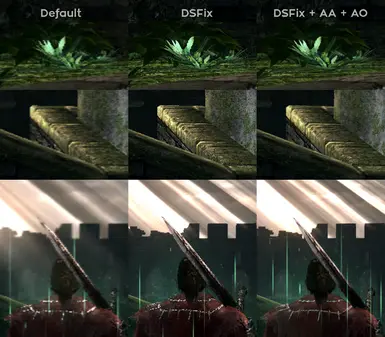
转载自PhysXPSP A Guide How to activate Antialiasing and HBAO+ with Nvidia 2017 Antialiasing and HBAO+ Guide for Nvidia 2017 This is a small guide to enhance Dark Souls to the maximum, and how to set up AA and AO for Nvidia. You need: DSFix Nvidia GeForce graphics card Nvidia Inspector You get the Nvidia Inspector and my dsfix version in the download section [line] Explanation DSFix allows you to set the internal render resolution, your display size, DoF resolution, and unlocks the FPS Nvidia Inspector allows you to set AA and AO abcdefghide abcdefghide Render resolution Should be equal or more of your display size, if less it can blur the image. Higher values will give much more distance information as objects and textures, and help the AA to look very good abcdefghide abcdefghide Display size Should be equal to your display size or equal to the render resolution. If less than render resolution then DSfix use a Gaussian downsampling method (blurs the image a bit). No AO works! If equal to render resolution it will activate AO, looks sharp, more performance impact. abcdefghide abcdefghide DoF resolution Use height. Should not be 720 or equal to display size to work properly. Small values blurs the...