
PHANTOM PACT ⚔️
Online Co-op For Phantom Blade Zero - 2 Players, 4 In Beta
Phantom Pact adds online co-op to Phantom Blade Zero. Each player runs their own game and keeps their own save, and Phantom Pact links the worlds: you see each other, fight the same enemies, take on bosses as a team, share loot and dust, and rest at bells together. The host’s world leads, and your partner joins in.
Open contribution, built by the community for the community. Let’s push it forward and fix bugs together: yhsharaf/PhantomPact
How It Works
• Press F5 in the game, pick Steam, Tailscale or Other network, then press HOST or GUEST. No text file and no restart.
• Each player loads their own save. Joining takes you to the host once, even on another map.
• A tip at the bottom of the screen says “partner connected” when you’re linked. The compass at the top shows which way your partner is.
Installation Instructions
Everyone who plays does this. To find the game folder: Steam > right-click the game > Manage > Browse local files.
1. Install UE4SS
Get UE4SS for Phantom Blade Zero. Put dwmapi.dll and the ue4ss folder in platform\steam, next to PBZ.exe.
2. Extract Phantom Pact
Extract everything in the Phantom Pact zip into the game folder, the one with platform, ProjectPBZ and steam in it, not next to PBZ.exe. Say yes to merging folders.
3. Check It Landed
You should now have a PBZCoop folder in platform\steam\ue4ss\Mods.
4. Connect
Start the game and load your saves, the host first, then follow the F5 tutorial below.
The first time you host, Windows asks whether the game may use the network: click Allow. That window can open behind the game, so Alt+Tab if the guest can’t connect.
Updating: everyone extracts the new version over the old one, then presses HOST or GUEST in F5 again.
Playing alone: press LEAVE in F5.
To uninstall: delete platform\steam\ue4ss\Mods\PBZCoop from the game folder.
F5 Panel Tutorial
Press F5 once you’re in the world, on both PCs. The game doesn’t pause, so open it somewhere safe.
• Language: English or 中文 at the top changes the panel and the co-op messages.
• Connect Through: pick the same one on both PCs. Steam needs no setup. For Tailscale or Other network, the host sends their address to the guest, who copies it and presses Paste address.
• Password (optional): copy the same password on both PCs and press Paste password before you connect.
• HOST: one player presses it, and Status says it’s waiting for a partner.
• GUEST: the other player presses it. Status shows who you’re connected to and your ping, and you’re taken to the host.
• MORE: TP > PARTNER, PvP, the partner compass, your partner on the map, Steam Direct, 4 Players and Mode.
• LEAVE: ends co-op. Your choices are kept for the next start.
Press Esc, F5 or the X to close the panel.
Ways To Connect
• Steam: nothing to set up. You must be Steam friends, and the host must show as in the game, so not Invisible.
• Tailscale: with Tailscale, everyone signs in to the same network. The guest copies the host’s address and presses Paste address. This also covers Hamachi, Radmin and a home network.
• Other network: for ZeroTier and UU Accelerator, with the host’s address pasted the same way.
• Prefer a text file? Open platform\steam\ue4ss\Mods\PBZCoop\PhantomPact.ini in Notepad. Host: Role = Host. Guest: Role = Guest, and HostAddress set to the host’s address.
Main Features
• See your partner’s Soul live, with their attacks, guard, skills and hit reactions
• Shared enemies: the host’s game runs them, and you both see and fight the same ones
• Shared boss fights, with the boss health bar and fog walls for both of you
• Boss fights wait for everyone: die and you watch your partner until it’s over. Join during one and you watch, then go to them
• Enemies stay on one of you for about 15 seconds, then turn on the other if they’ve been hitting it
• Everything’s shared: what one of you gets from a chest, a pile or the ground, the other gets too. What you buy or make stays yours
• Shared dust and bell rests
• The game doesn’t pause while you’re linked, in the F5 panel or the game’s own menu: enemies keep coming
• Partner compass, your partner on the map, and tips when they connect, go down or wander off
• Elden Ring–style co-op difficulty: enemies and bosses get 50% more health and 30% more posture with a partner
• PvP duels with the game’s own block, parry and dodge: turn it on under MORE in F5
4 Players (Beta)
The host turns it on before pressing HOST: F5 > MORE > 4 PLAYERS (Beta) > ON. Up to 3 guests can join, and OFF is the normal 2 players. Enemies and bosses get 50% more health for each person connected. PvP stays off.
This is a beta: four real players haven’t played this version together yet. Please tell us how it goes in the Bugs tab.
Two Players On One PC (In Testing)
Split-screen local co-op is in the same download, with no internet or second PC needed. Each player uses a pad, or player 1 uses the keyboard and mouse and player 2 a pad. You share one save, backpack and dust.
1. Turn On Local Mode
Press F5 > MORE > Mode > LOCAL and restart the game. Or open platform\steam\ue4ss\Mods\PBZCoop\PhantomPact.ini in Notepad and set Role = Local. To go back, press MULTIPLAYER in the F4 panel.
2. Set Up Your Pads
PlayStation pads need these steps, with one pad or two. Without them the game sends every pad to player 1.
• Turn off Steam Input: in Steam, right-click the game > Properties > Controller, then pick Disable Steam Input.
• Install DS4Windows: connect your pads and leave it running. The game then sees them as Xbox pads.
• Install HidHide: this stops the game seeing the real pads as well. Open it, add DS4Windows.exe under Applications, then on the Devices tab tick your pads and Enable device hiding.
• Check DS4Windows: the Ex column should show a tick for each pad. If it doesn’t, reconnect the pads.
Xbox pads shouldn’t need any of this, but we haven’t tested them yet.
3. Play
Start the game and press CONTINUE. Player 2 appears beside you within a few seconds. Press F4, hold a button on each pad to light up its card, drag the cards onto the players and press APPLY. The zip’s Phantom Pact - LOCAL CO-OP.md has player 2’s controls.
Online co-op needs none of these pad steps. If your pads stop working in other games, turn off Enable device hiding in HidHide. A game update can break two-pad play until the mod is updated.
Requirements
• Phantom Blade Zero on Steam, for every player
• UE4SS for Phantom Blade Zero 1.0.1 by Vercadi, for every player
• Everyone on the same Phantom Pact version: 1.4.1 or older can’t connect to 1.5.0
• No Python needed: the connection runs inside the game
Good To Know
• The host leads into new areas and boss arenas. Stay close when you’re about to start a boss
• Cutscenes, dialogue, spending dust, quests and story progress aren’t shared yet
• Don’t press Ctrl+R (UE4SS hot reload) while playing together: restart the game instead
Not Connecting?
• Did the host allow the game through Windows Firewall? That window can open behind the game
• The guide in the zip, Phantom Pact - INSTALL.md, has a Connection problems section
• Still stuck: post your ue4ss\UE4SS.log, ue4ss\Mods\PBZCoop\net_status.txt and ue4ss\Mods\PBZCoop\relay_log.txt in the Bugs tab
Shoutouts
• Vercadi, for UE4SS for Phantom Blade Zero, which made modding this game possible
• EXACG, for the 4-player work (EXACG on GitHub)
• appdoze, for the security review and code (appdoze on GitHub)
• The UE4SS team (RE-UE4SS on GitHub)
• S-GAME and the game’s developers for Phantom Blade Zero
简体中文
幻影契约(Phantom Pact)为《影之刃零》加入线上联机。每位玩家各自运行自己的游戏、保留自己的存档,模组把世界连接起来:你们能看到彼此,一起对付同样的敌人和首领,共享战利品和尘,并一同在钟旁休息。
安装
每位玩家都要安装。打开游戏文件夹:Steam > 右键点击游戏 > 管理 > 浏览本地文件。上面的三张图对应下面的第 1 到第 3 步。
• 安装 UE4SS for Phantom Blade Zero:把 dwmapi.dll 和 ue4ss 文件夹放进 platform\steam,和 PBZ.exe 放在一起。不需要安装 Python。
• 把压缩包里的所有内容解压到游戏文件夹,也就是有 platform、ProjectPBZ 和 steam 的那个文件夹,不是 PBZ.exe 所在的文件夹。提示合并文件夹时选择“是”。
• 确认 platform\steam\ue4ss\Mods 里有 PBZCoop 文件夹。
• 启动游戏并读取存档,房主先进,然后按下面的 F5 面板教程操作。
• 第一次开房时,Windows 会询问游戏能否使用网络,请点击允许。这个窗口可能在游戏后面,连不上时按 Alt+Tab 查看。
F5 面板教程
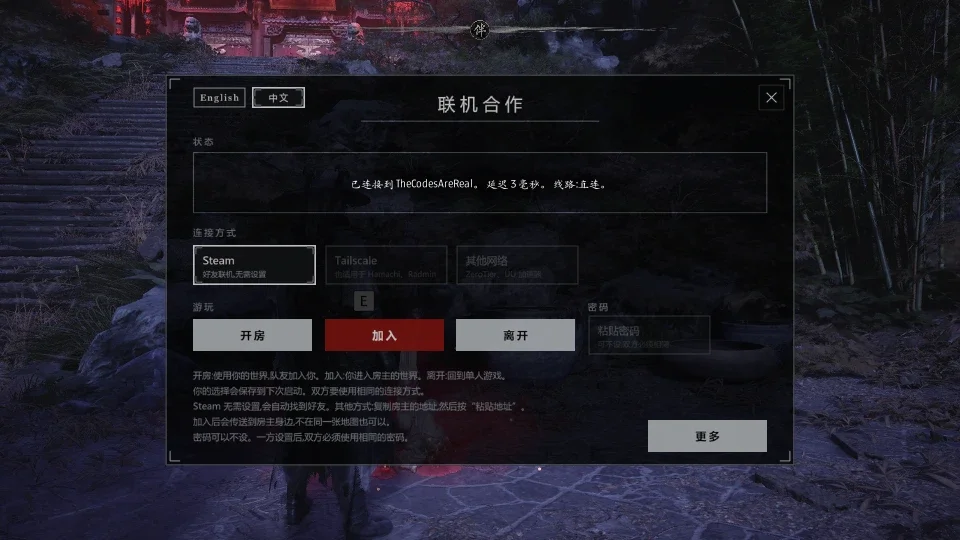
进入游戏世界后,两台电脑都按 F5。游戏不会暂停,请在安全的地方打开。上面的第 4 张图就是这个面板。
• 语言:顶部的 English 和中文可以切换面板和联机提示的语言。
• 连接方式:两台电脑选择同一种。Steam 无需设置。使用 Tailscale 或其他网络时,房主把地址发给客人,客人复制后按粘贴地址。UU 加速器和 ZeroTier 选其他网络。
• 密码(可不设):连接前,两台电脑复制同一个密码,然后按粘贴密码。
• 开房:一方按下后,状态栏会显示正在等待队友。
• 加入:另一方按下后,状态栏会显示连接的对象和延迟,然后你会被传送到房主身边。
• 更多:传送到队友、PvP、队友指南针、地图上的队友、Steam 直连、4 人模式和模式。
• 离开:结束联机。你的选择会保存到下次启动。
按 Esc、F5 或 X 关闭面板。
4 人模式(测试版)
由房主在开房前打开:F5 > 更多 > 4 人模式(测试版) > 开。最多 3 名队友可以加入,选“关”就是普通的两人联机。每多连接一个人,敌人和首领的生命增加 50%。PvP 保持关闭。这是测试版,这个版本还没有四名真实玩家一起玩过,欢迎在 Bugs 页面反馈。
同一台电脑两个人玩(测试中)
本地分屏也在同一个下载里,不需要网络,也不需要第二台电脑。可以每人一个手柄,也可以玩家 1 用键盘鼠标、玩家 2 用手柄。你们共用一个存档、背包和尘。
• 打开本地模式:按 F5 > 更多 > 模式 > 本地分屏,然后重启游戏。也可以用记事本打开 platform\steam\ue4ss\Mods\PBZCoop\PhantomPact.ini,设置 Role = Local。要切换回去,在 F4 面板里按 MULTIPLAYER。
• 使用 PlayStation 手柄时,无论一个还是两个,都要先做下面三步,否则游戏会把所有手柄都交给玩家 1。关闭 Steam 输入:在 Steam 中右键点击游戏 > 属性 > 控制器,选择禁用 Steam 输入。
• 安装 DS4Windows:连接手柄并让它保持运行。
• 安装 HidHide:打开后在 Applications 里添加 DS4Windows.exe,再到 Devices 勾选你的手柄和 Enable device hiding。然后确认 DS4Windows 的 Ex 一列中每个手柄都有勾,没有的话请重新连接手柄。
• 启动游戏,按 CONTINUE。几秒后玩家 2 会出现在身边。按 F4,按住每个手柄上的任意键点亮它的卡片,把卡片拖到玩家上,再按 APPLY。玩家 2 的操作见压缩包里的 Phantom Pact - LOCAL CO-OP.md。
Xbox 手柄应该不需要这些步骤,但我们还没有测试过。线上联机不需要这些手柄设置。如果手柄在其他游戏里不能用,请在 HidHide 里关闭 Enable device hiding。游戏更新后,双手柄可能无法使用,需要等模组更新。
没有连接上?
确认房主已允许游戏通过 Windows 防火墙。更多内容见中文安装说明。仍然不行,请在 Bugs 页面附上 ue4ss\UE4SS.log、ue4ss\Mods\PBZCoop\net_status.txt 和 ue4ss\Mods\PBZCoop\relay_log.txt。
Fan-made mod, not affiliated with or endorsed by S-GAME.

影之刃零多人联机模组
作者:TheCodesAreReal下载:129 次版本:1.0.14
2步联机:
① 在汽游客户端安装联机 MOD
② 前往联机大厅,创建或加入房间